
SALES SPLIT
One sales total.
Multiple controlled vouchers.
Choose the Maximum Voucher Amount and LekhaFlow calculates the voucher count and final remainder for the sales workflow.
REAL PRODUCT INTERFACE
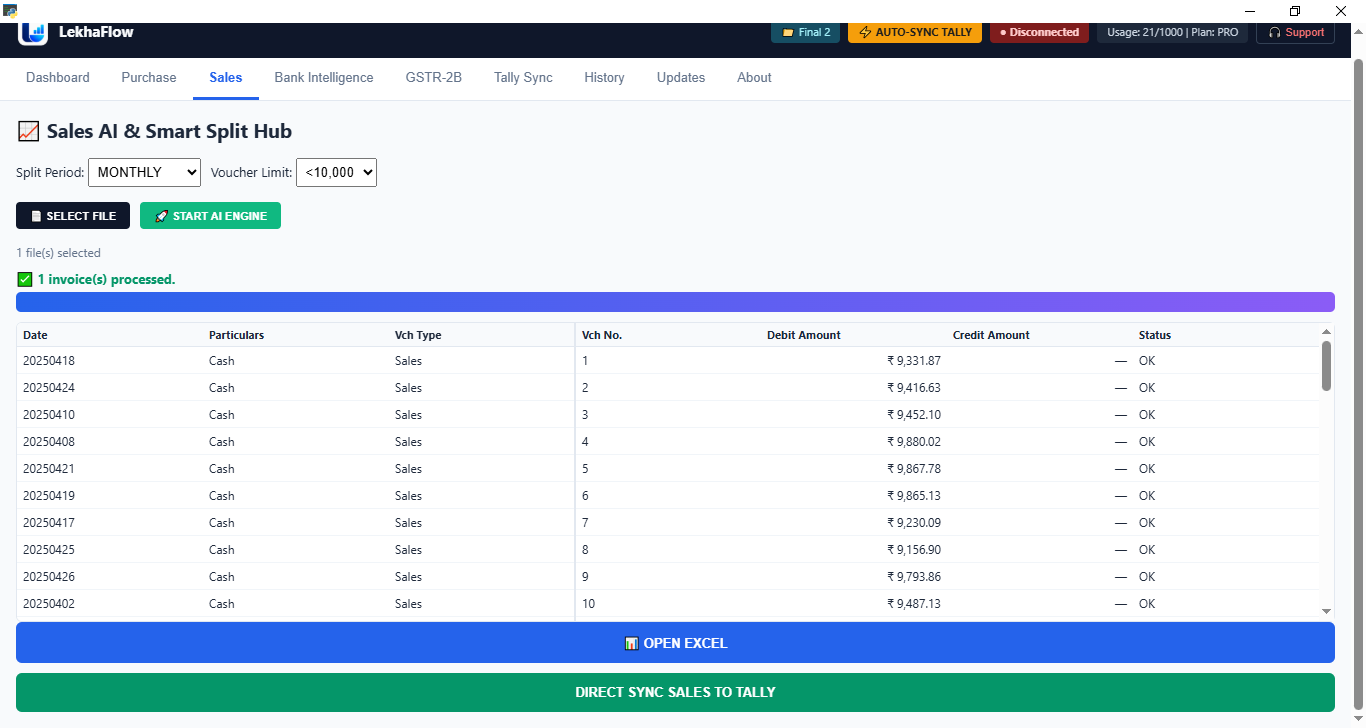
See Sales Split inside LekhaFlow.
This is the actual Sales AI & Smart Split Hub used in the LekhaFlow desktop workflow.
LIVE WORKFLOW DEMO
See the split calculation instantly.
This is the rule the page communicates: each generated voucher is capped at the selected maximum amount, with the remaining balance placed in the final voucher.
Sales Total
₹75,000
The selected amount is the maximum value allowed in one generated voucher.
Generated Result
2 vouchers
Check
₹75,000 total generated
SALES WORKFLOW
Calculate. Review. Send.
Sales Split is the sales workflow in LekhaFlow — not a separate automation layer. The generated vouchers can be reviewed before the final Tally operation.
Select sales files
Process the sales data
Choose the maximum voucher amount
Review generated vouchers
Send the approved result to Tally
Excel review
Open the processed result in Excel when a separate review or working copy is useful.
Review before Tally
Inspect the generated voucher result before the final sync.
Direct Tally workflow
Send the approved sales result to the selected Tally company.