
PURCHASE AUTOMATION
Turn Purchase Invoices
Into Tally-Ready Vouchers.
Scan purchase invoices with AI, review the complete accounting result inside LekhaFlow, open the processed data in Excel and send the final voucher directly to Tally.
AI invoice processing
Read purchase invoices and turn document data into accounting data.
Review before Tally
Inspect the generated accounting result before final sync.
Excel + Tally
Use Excel for review or send the final result directly to Tally.
THE PURCHASE WORKFLOW
The invoice is only the beginning.
LekhaFlow is designed to take the purchase document beyond simple data extraction. The processed invoice becomes a structured accounting result that can be checked before it reaches Tally.
FROM DOCUMENT TO ACCOUNTING
REAL LEKHAFLOW INTERFACE
See what the client actually gets.
The purchase workflow is designed around a reviewable accounting result — not a blind document conversion.
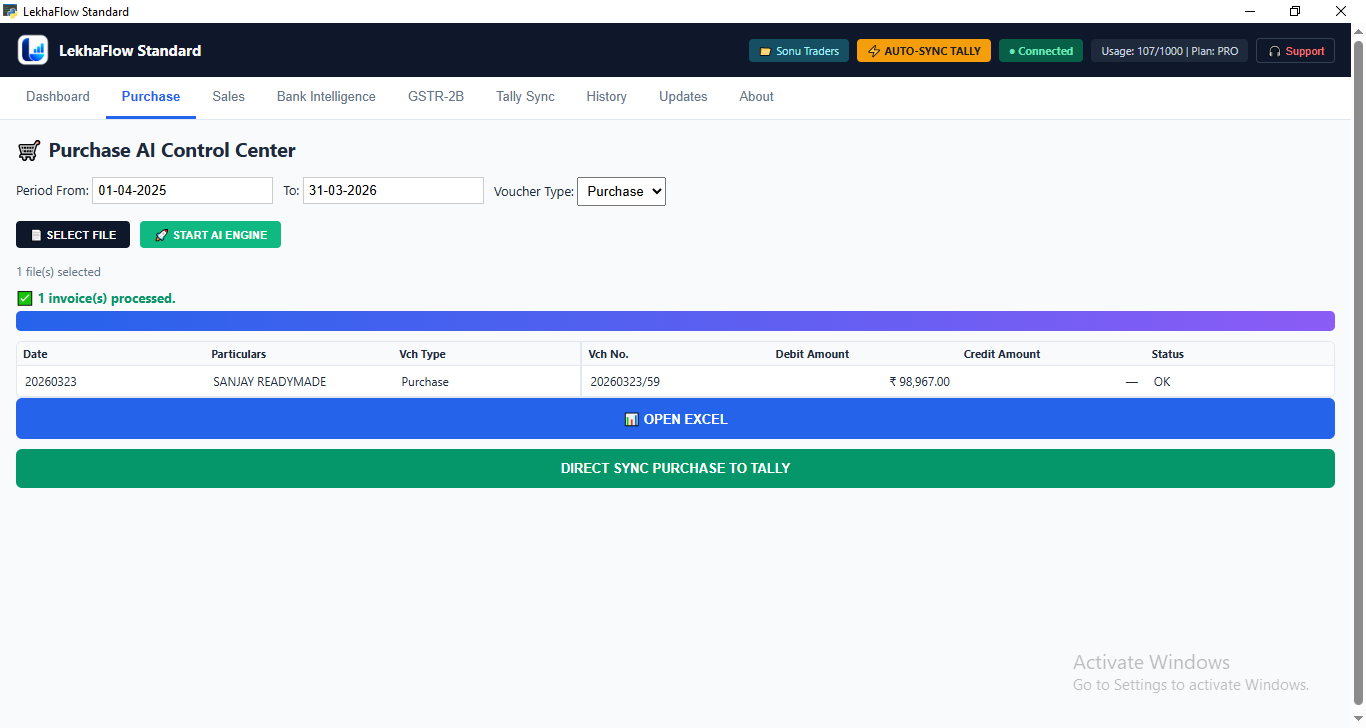
Real LekhaFlow product interface — the screenshot will be used here to show the actual Purchase workflow to prospective clients.
HOW PURCHASE AUTOMATION WORKS
From purchase invoice to final accounting result.
LekhaFlow processes the purchase document, creates the accounting result and gives the user an opportunity to inspect it before the final Tally operation.
Select Purchase Invoice
Choose purchase invoices or accounting documents.
Process the purchase document
Let LekhaFlow read and structure the purchase document.
Build Accounting Result
Generate the accounting result from the processed invoice.
Review Before Tally
Inspect the generated result before anything is synced.
Export or Sync
Open the result in Excel or send it directly to Tally.
REVIEW BEFORE TALLY
Tally-ready does not mean blind export.
Before the final sync, the generated purchase accounting result can be inspected inside LekhaFlow.
ITEM QUANTITY & UOM
Keep the source quantity meaningful.
Purchase processing keeps quantity, unit and rate visible in the accounting workflow so the review result remains understandable before Tally.
The review keeps quantity, per/UOM and rate visible instead of unnecessarily converting the displayed unit into pieces.
EXPORT
Open the processed result in Excel.
The processed purchase accounting data can also be opened in Excel, providing a convenient review and working format.
TALLY SYNC
Send the final voucher directly to Tally.
Once the accounting result has been reviewed, the final purchase result can be sent to the selected Tally company.
READY TO TRY IT?
Stop entering purchase invoices manually.
Process a real purchase invoice, review the generated accounting result and see how LekhaFlow fits into your existing Tally workflow.